
Pay a bill


Secure payment
When you pay a bill or shop online we use eWAY digital payment security

Delivery
Hardware purchased via our website is securely delivered by TNT Express

SSL encryption
SSL data encryption protects the information you send us online
Direct Debit
Setting up Direct Debit
To pay a bill automatically on the due date by Direct Debit complete and submit the Direct Debit Request (DDR) below. You will receive your bill prior to the due date to ensure you have had time to contact us with any queries.
About Direct Debit
Direct Debit is an automatic transaction that transfers money from your bank account to another. Direct debit is handy for paying regular bills, such as your monthly phone bill. Automatic payment means you don’t have to remember to pay a bill by the due date.
Direct Debit FAQ’s
On what day will my bank account be debited?
If you have set-up Direct Debit, your nominated bank account will be automatically debited the invoice amount due on the due date indicated on your bill. You will receive your bill prior to the due date to ensure you have had time to contact us with any queries.
If the due date falls on a weekend, public holiday, or non-banking day we may automatically debit the invoice amount due on the next weekday, or normal banking day. This may vary due to banking and direct debit processing delays.
How can I cancel future Direct Debit payments?
If you have set-up Direct Debit, your nominated bank account will be automatically debited the invoice amount due on the due date indicated on your bill. You will receive your bill prior to the due date to ensure you have had time to contact us with any queries.
If the due date falls on a weekend, public holiday, or non-banking day we may automatically debit the invoice amount due on the next weekday, or normal banking day. This may vary due to banking and direct debit processing delays.
What happens if I do not have sufficient funds?
If you have set-up Direct Debit, your nominated bank account will be automatically debited the invoice amount due on the due date indicated on your bill. You will receive your bill prior to the due date to ensure you have had time to contact us with any queries.
If the due date falls on a weekend, public holiday, or non-banking day we may automatically debit the invoice amount due on the next weekday, or normal banking day. This may vary due to banking and direct debit processing delays.
Is there a charge if I pay a bill using Direct Debit?
There is no charge to pay us using Direct Debit.
What happens if the bill due date is a bank holiday?
If the due date indicated on your bill falls on a weekend, public holiday, or non-banking day we may automatically debit the invoice amount due on the next weekday, or normal banking day. This may vary due to banking and direct debit processing delays.
About your bill
About your bill
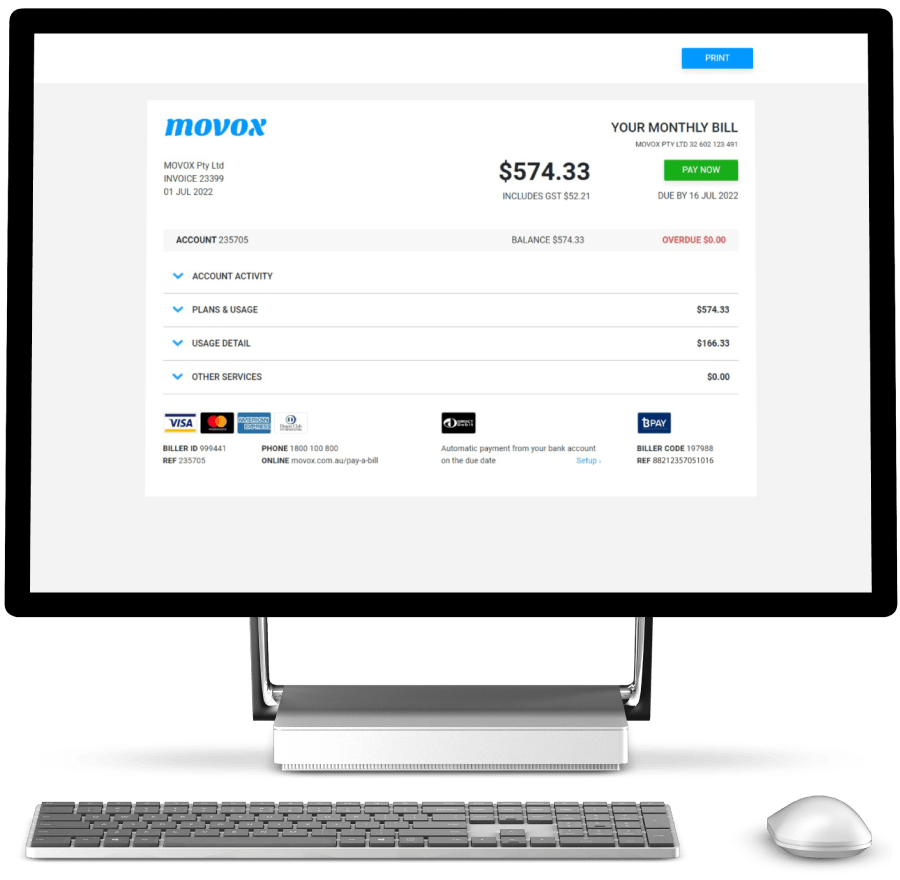
Our bills are designed to be viewed online in your web browser. From your web browser bills can be printed, saved or forward to someone else and you can pay a bill directly by clicking the Pay Now button.
Viewing calls and itemised charges
Clicking any summary section, content box, heading or product icon will reveal detailed information and usage charges related to the selected section.
Payment details
You can pay a bill by BPay, Direct Debit or online and over the phone using a credit or debit card. When paying by BPay, or by card you will need your payment details which are located at the bottom of page 1 of your bill.
Billing queries
We encourage you to contact us if you are experiencing difficulties paying for our services or you think there is a problem with our charges. Any undisputed amount should be paid immediately whilst we review your queries.
Billing FAQ’s
How and when will I receive my bill?
If you’ve subscribed to one of our recurring plans we’ll send a monthly invoice to your nominated email address, which will contain details of your services and itemise any charges for each service, such as call charges.
The email will contain a “view bill” button, when pressed your bill will automatically open in your web browser.
Monthly bills include recurring charges in advance and usage charges incurred in previous billing periods.
Your online bill is dynamic, we’ve designed it to be easily read as a summary or by clicking any content box, heading or product icon you can view detailed information and usage charges.
We’ll send you an email each time a new bill is issued.
To view your bill click the link within the email or login to your account to view current and past bills.
Where can I view my itemised charges?
To view itemised charges, expand sections of your bill by clicking the down V arrow next to section headings
How can I pay a bill?
You can pay a bill using any of the following payment methods:
BPAY
Use BPAY to pay from your bank account or credit card. Instructions on how to do so can be found here: https://movox.com.au/pay-a-bill/
Your MOVOX BPAY biller code and reference number are located at the bottom of your invoice cover page.
By phone
Call 1800 100 800 (option 1) any time to pay by Visa, MasterCard, AMEX or Diners.
Your MOVOX biller ID and reference number are located at the bottom of your invoice cover page.
Online
Click here: https://movox.com.au/pay-a-bill Pay-a-bill to pay by Visa, MasterCard, AMEX or Diners.
Your MOVOX biller ID and reference number are located at the bottom of your invoice.
Direct debit
Use Direct Debit to automatically debit your nominated bank account the monthly invoice amount on the due date. To setup Direct Debit please complete and submit the Direct Debit Request (DDR) form located on this page.
What happens if I don't pay by the due date?
Customers who have failed to pay their account in full by the due date will be sent an overdue notice on the third day following the due date.
The overdue notice will be sent by email. It advises the customer that MOVOX has not received payment of their account to pay within 7 days.
The notice also advises to disregard the notice if they have made a payment within the past 3 days.
If you are having difficulty in paying the invoiced amount please email us at accounts@movox.com.au or call us on 1800 100 800 (Mon-Fri, 9am-5pm AEST).
Is there a surcharge if I pay using a credit card?
There’s no surcharge when using VISA or MasterCard. AMEX and Diners Club cards incur 4% payment surcharge.
Pay a bill using BPay
Pay Your MOVOX Bill with BPAY
BPAY is a simple, secure way to pay a bill directly from your online banking. Used by over 55,000 Australian businesses, BPAY allows you to manage and pay a wide range of bills from one convenient place.
BPAY is available through the online banking platforms of more than 140 financial institutions, typically found in the “Pay anyone” or “Payments” section of your banking app or website.
How to Pay Using BPAY
If you already have BPAY set up:
1. Sign in to your online banking
2. Select the BPAY payment option
3. Enter the following details:
Biller Code: 197988
Reference Number: Bottom of page 1 on your MOVOX bill
Payment Amount
4. Confirm and select Pay Now
Setting Up BPAY
If you don’t currently use BPAY, sign in to your financial institution’s website, search for BPAY, and follow the setup instructions.
Alternatively, contact your bank or financial institution for assistance.